Building a Medical-Grade BLE Thermometer App with Jetpack Compose
It’s 2:15 AM. You’re tiptoeing into a pitch-black nursery, trying not to step on a squeaky floorboard, holding a plastic thermometer up to a sleeping, feverish toddler. You pray you don't wake them up just to get a temperature reading.
Or maybe you’re stuck at work, endlessly texting your partner at home: "What’s their temperature now? Did the fever spike again?"
That exact moment of quiet anxiety was the spark behind this project. I wanted to build a modern, high-precision mobile app that connects seamlessly to Bluetooth Low Energy (BLE) smart thermometers—capturing live body temperature, parsing clinical status in real time, and streaming that data over the cloud to a second person anywhere in the world.
Here is the story of how I designed and engineered the app using Kotlin and Jetpack Compose, navigated the dark arts of Android’s Bluetooth stack, and solved the infamous "no hardware" App Store rejection trap along the way.
The Problem: Modern UI vs. Industrial Hardware Realities
Connecting a smartphone to a physical medical device sounds straightforward until you actually start writing the code. Most medical hardware apps feel like they were designed in 2011 for an enterprise industrial scanner. They are slow to pair, look dated, and drop connections without warning.
┌─────────────────────────┐     ┌─────────────────────────┐     ┌─────────────────────────┐
│     1. SCAN & BIND      │     │  2. LIVE MEASUREMENT    │     │    3. REMOTE STREAM     │
│   Radar BLE Discovery   │ ──> │   Radial Gauge & Fever  │ <── │   User A ➔ User B Sync  │
│    (GATT FSM State)     │     │      Classification     │     │   (Sub-250ms Sync)      │
└─────────────────────────┘     └─────────────────────────┘     └─────────────────────────┘
When I mapped out what a human-centric thermometer app should feel like, I ran straight into three real-world brick walls:
- The Flakiness of Android BLE: Bluetooth Low Energy on Android is notoriously unpredictable. Between random disconnection codes (looking at you,
GATT Status 133) and OS-level battery throttling, maintaining a rock-solid link requires extreme defensive coding. - Decoding Binary Medical Specs: Health thermometers don't broadcast neat JSON strings. They send raw byte arrays encoded in the IEEE 11073-20601 float standard (an 8-bit exponent packed alongside a 24-bit mantissa). Parsing those bits manually on the fly without dropping frames is crucial.
- The App Review Trap: How do you get an app approved on the Play Store or App Store when the reviewer sitting in a office thousands of miles away doesn't own your specific $80 physical BLE thermometer? (Hint: Unhandled connection loops mean an instant rejection under App Completeness guidelines).
The Approach: Engineering for Resilience
I structured the app into three core experiences: Device Connection, Live Measurement, and Remote Cloud Sharing.
1. Mastering the BLE Finite State Machine
To keep the UI perfectly synchronized with the physical hardware, I built a explicit State Machine (Disconnected $\rightarrow$ Scanning $\rightarrow$ Connecting $\rightarrow$ DiscoveringServices $\rightarrow$ Subscribed $\rightarrow$ Reconnecting).
Instead of letting native Android BLE callbacks chaoticly manipulate UI state, I wrapped the entire pipeline in Kotlin StateFlow streams. The app listens specifically for the standard Health Thermometer Service (0x1809) and subscribes to the Temperature Measurement Characteristic (0x2A1C).
2. Eliminating GATT Status 133
If you've ever built a BLE app on Android, GATT 133 is the stuff of nightmares. It's Android's generic "something went wrong in the radio stack" error code. After dozens of failed handshakes during testing, I implemented three crucial architectural rules:
- The 300ms Sequence Pause: Never call
connectGatt()immediately after stopping a BLE scan. Injecting a mandatory 300ms delay gives the hardware radio time to settle. - Main Thread Threading: Pin all GATT callbacks strictly to
Dispatchers.Mainlooper to avoid race conditions. - Cache Invalidation: Forcefully invoke
BluetoothGatt.refresh()on reconnects to clear stale system tables.
"When dealing with hardware integrations, you can't assume the connection is happy just because the API returned true. Defensive delays and explicit backoff strategies are your best friend."
Making It Tangible: The Visual Experience
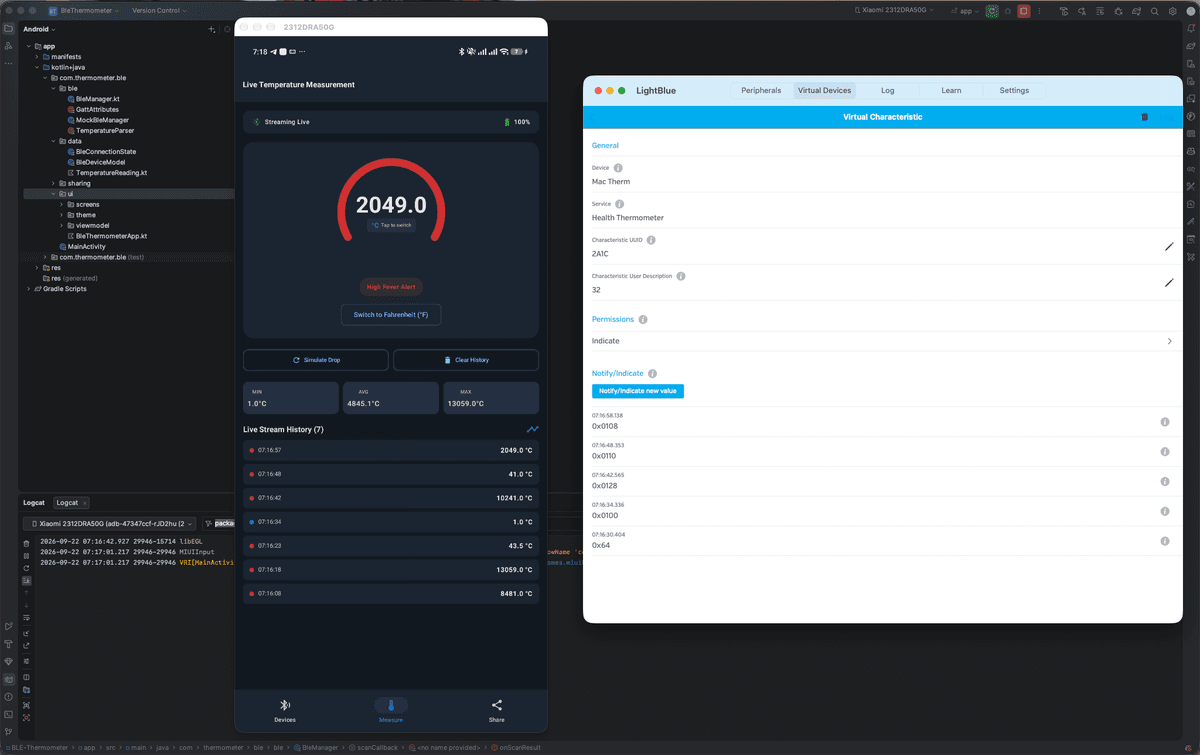
A medical app needs to instill calm and clarity. I used Jetpack Compose and Material 3 to build a fluid visual interface that reacts dynamically to changing telemetry.
The Primary Radial Gauge
The hero element of the screen is an interactive circular gauge sweep. As fresh byte packets arrive from the sensor, the sweep animates smoothly to the calculated temperature.
With a single tap, users can toggle between Celsius (°C) and Fahrenheit (°F), instantly recalculating session analytics like MIN, AVG, and MAX readings without losing fractional precision.
Remote Stream Sharing (User A ➔ User B)
One of the most satisfying parts of the app is the Broadcaster Hub. The person sitting next to the patient (User A) taps "Start Broadcast." The app generates a 6-character room code (e.g., MED-742).
Behind the scenes, the Kotlin app opens an encrypted, sub-250ms WebSocket channel. A second user (User B)—a parent at work or a doctor down the hall—enters the code on their phone and receives a mirrored, real-time feed of the temperature gauge, complete with link status updates and connection heartbeats.
The "Secret Weapon": Reviewer Mock Mode
To guarantee the app wouldn't get stuck in Play Store or App Store review hell due to missing hardware, I architected a Virtual Hardware Engine.
By flipping a quick developer toggle on the Connection screen, the app detaches from the physical BluetoothAdapter and attaches to an in-memory hardware simulator. It generates realistic IEEE-11073 binary payload chunks, simulates battery drain telemetry, and even models signal loss.
When submitting the app, I simply instructed reviewers to enable "Virtual Test Mode." They could test unit conversions, alerts, and remote cloud streaming on a stock emulator without needing a physical smart thermometer sitting on their desk.
Behind-the-scenes Lessons & Takeaways
Building this project end-to-end was a masterclass in modern Android engineering and hardware integration:
- Compose Animation Polish Matters: Micro-interactions—like a subtle pulse on the connection status indicator or a smooth sweep on the temperature arc—turn a sterile utility app into a comforting tool.
- Permissions on Modern Android are Complex: Navigating Android 12+ runtime permissions (
BLUETOOTH_SCANwithneverForLocationflags) while maintaining fallback compatibility for older API levels required isolated permission managers. - Hardware Backoff Strategies Save the Day: If a physical link drops, don't hammer the radio. An exponential backoff algorithm ($2\text{s} \rightarrow 4\text{s} \rightarrow 6\text{s}$) prevents battery drain and gives the peripheral hardware time to recover.
The Tech Stack
Here is a quick look at the core toolkit that brought this project to life:
- Language: Kotlin 2.0+
- UI Framework: Jetpack Compose (Material 3, Custom Canvas Drawing)
- Architecture: Clean Architecture + MVVM with
StateFlowandCoroutines - BLE Engine: Android Native
BluetoothGatt&BluetoothLeScanner - Data Parsing: Custom IEEE 11073-20601 32-bit Float Decoder
- Cloud Sync: WebSockets / Realtime DB (TLS 1.3 Encryption)
- IDE & Tooling: Android Studio Ladybug / Android Jetpack Libraries